

What is a WMS system? The definition
What is a WMS system? The definition
A WMS system (warehouse management system) is software that helps manage and optimize warehouse operations — including inventory control, picking, packing, and shipping. It acts as the brain of the warehouse, helping coordinate both manual and automated tasks in real time.
Need a Quick Introduction to WMS?
Watch our short intro video to understand what a WMS system is, how it works, and how it supports smarter, more efficient warehouse operations.
What does a WMS do?
A WMS directs the day-to-day work in your warehouse. It decides where goods should be stored and which tasks operators should carry out next. It also tracks inventory as goods move through receiving, picking, packing, and shipping.
It exchanges data with other warehouse IT systems, such as the ERP and transport management system. In automated warehouses, it can send work instructions to a warehouse control system (WCS), which manages equipmentMHI explains how these systems work together.
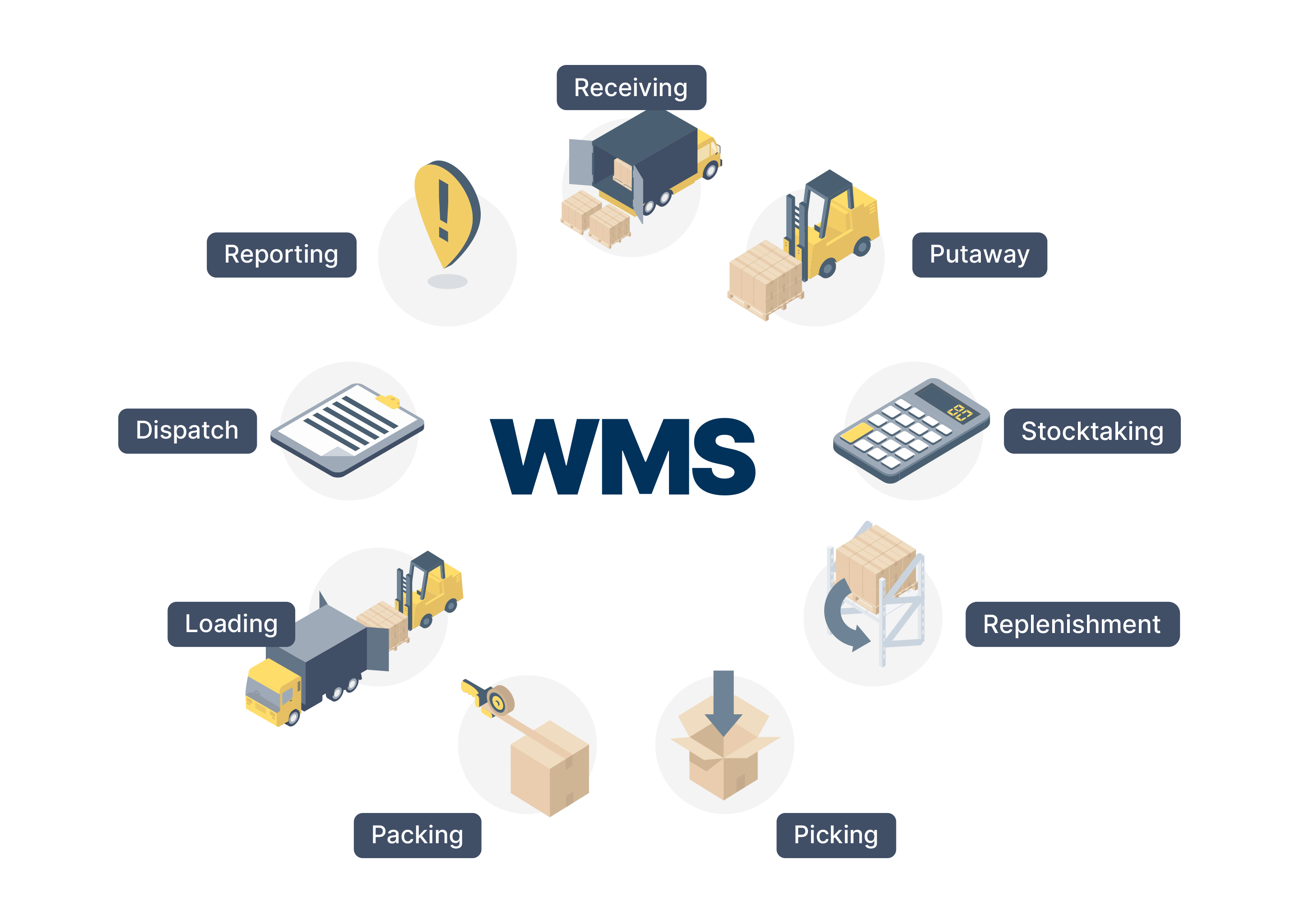
The image below shows the warehouse processes a WMS supports.
How does a warehouse management system work?
A WMS uses order data and information about stock in the warehouse to decide which tasks need to be carried out. It sends instructions to operators or automation systems, then updates inventory records as work is confirmed.
The Association for Supply Chain Management (ASCM) explains the main warehouse processes. Here is an example of how a WMS supports the flow from goods receipt to dispatch:
- Receive goods. An operator scans an incoming pallet. The WMS records the receipt and makes the stock visible in the system.
- Put goods away. The WMS directs the operator to a suitable storage location according to the warehouse’s rules. The confirmed location is recorded.
- Replenish picking locations. As stock is used, the WMS can create tasks to move goods from reserve storage to the picking area.
- Pick and pack orders. The WMS issues picking instructions. Scanning helps operators check that they have picked the correct articles before packing.
- Ship goods. The WMS organizes shipments by departure time and fulfillment priority. It records dispatch and shares updates with connected systems.
8 Core Features of a Warehouse Management System (WMS)
Here are eight common WMS features. The available functions depend on the solution and its configuration:
Inventory management
- accurately tracking inventory within the warehouse
- providing real-time visibility into stock levels, locations, and movements of goods
- tracking goods by batch or serial number to support traceability
Order management
- prioritizing incoming customer orders based on fulfillment requirements, such as departure time
- processing and consolidating orders
- optimizing order workflows
Goods movement
- checking and labeling incoming goods
- selecting the optimal storage location for items based on picking frequency
- forecasting when an article should be replenished based on previous order patterns
Picking & packing
- optimizing pick rounds and routes, creating picklists
- verifying picking accuracy with barcode scanning or RFID technology
- selecting the optimal package for shipments based on product dimensions, material, and transportation cost
Value-added services (VAS)
- controlling additional services in the warehouse
- adding value to the article without changing the article number, e.g., shoe impregnation, calibrating TV screens
- adding extra services before shipping goods, e.g., gift wrapping
Outbound goods
- labeling outbound products and creating delivery notes
- organizing shipments according to departure time and fulfillment priority
- supporting load planning and loading sequences, including which shipments are loaded together and in what order
System integration
- collecting and exchanging data with other systems, e.g., from WMS to a business intelligence tool
- integrating with other software such as ERP and TMS
- integrating with warehouse machinery
Reporting
- collecting and presenting various data on warehouse performance, such as inventory levels, order fulfillment, warehouse throughput, and labor efficiency
- giving a clear and visual overview of warehouse operations in real time to facilitate decision-making and operational improvements
Some WMS solutions also offer AI-based optimization.
For example, an AI-based pick group optimization module in your WMS can analyze historical ordering patterns. The system can suggest moving articles to a more optimal pick area by learning which articles are ordered together.
See a WMS in action
In this short video, you’ll see how Astro WMS® supports real-life warehouse operations – from receiving and picking to real-time optimization and integration with automation.
Astro WMS® helps businesses across industries solve everyday warehouse challenges like labor shortages, space constraints, picking inefficiencies, and high operational costs.
Real-world results: How our customers use WMS
At Brafab, warehouse operators struggled to locate stored goods. After implementing Astro WMS®, the company reported twice the speed of picking order lines with 100% accuracy. Read the Brafab customer story.
What problems does a warehouse management system solve?
A WMS helps address inventory discrepancies and errors in order fulfillment. It also supports more efficient use of warehouse space and labor. Here are common problems and the functions used to address them:
|
Warehouse problem |
How a WMS helps |
|---|---|
|
Inventory discrepancies |
Tracks stock levels and locations, updating records as goods movements are confirmed. |
|
Picking errors |
Provides picking instructions and uses scanning to verify the articles being picked. |
|
Unnecessary warehouse travel |
Groups orders and optimizes picking routes to reduce unnecessary travel. |
|
Poor use of storage space |
Uses inventory information and picking frequency to support goods placement. |
|
Late dispatch |
Prioritizes warehouse tasks and organizes shipments by departure time. |
|
Gaps in traceability |
Records goods movements. Batch and serial tracking can provide more detail where supported. |
Key benefits of a WMS system – Why companies use a warehouse management system
A WMS optimizes workflows and helps you use warehouse resources more efficiently. It can also support growth as order volumes increase. Read more about warehouse management system benefits.
What are the different types of WMS systems?
A WMS can be a dedicated application or a module within a broader business system. The table below explains the common software types.
|
Software type |
What it means |
|---|---|
|
Standalone and best-of-breed WMS |
A dedicated warehouse management application that connects to other business systems. Best-of-breed refers to its specialist focus. |
|
WMS module in an ERP system |
Warehouse management functionality offered within an enterprise resource planning system. |
|
WMS module in SCM software |
Warehouse management functionality offered within a broader supply chain management suite. |
Cloud-based WMS runs on cloud infrastructure. SaaS is a delivery model in which the provider hosts and maintains the application.
On-premises WMS runs on infrastructure at the organization’s own premises. A standalone system or a module in a wider suite can be deployed in the cloud or on premises, depending on the product.
ERP vs. WMS – What’s the difference?
An ERP system manages business-wide processes. A WMS focuses on detailed warehouse operations. The systems often exchange order and inventory data. Read more about ERP vs. WMS.
When do I need a WMS system?
Inventory discrepancies and rising order fulfillment errors are common signs that warehouse operations need more support. For other indicators, see when you need a warehouse management system.
How do I choose the right WMS system for my needs?
Start with your warehouse processes and the functions they require. For a detailed checklist, see how to choose the best warehouse management system.
Are you currently exploring options?
Our WMS warehouse system, Astro WMS®, is designed to support your long-term needs: it is scalable, rich in configurable core features and functionality, and adaptable across multiple sites. In addition, it can easily be integrated with any supplier’s automation equipment, giving you the freedom to choose when implementing a warehouse automation solution.
EXPLORE ASTRO WMS®
For operations with simpler flows and smaller setups, we also offer Astro Go WMS – a cloud-native, easy-to-use solution that’s quick to implement and ideal for growing logistics businesses and 3PLs.
EXPLORE ASTRO GO WMS